
Team Time Log – time spent on other students’ sites (must have 3 entries or more):
Date: Mar. 05, 08min From: 20:21 pm To: 20:29 pm
Date: Mar. 05, 07min From: 20:32 pm To: 20:39 pm
Date: Mar. 06, 05min From: 17:06 pm To: 17:11 pm
Students Time Log – time spent on other students’ sites (must have 4 entries or more):
Date: Mar. 03, 04min From: 12:47pm To: 12:51pm
Date: Mar. 03, 06min From: 12:59pm To: 13:05pm
Date: Mar. 04, 04min From: 20:21pm To: 20:25pm
Date: Mar. 05, 04min From: 21:21pm To: 21:25pm
Date: Mar. 06, 05min From: 23:23pm To: 23:28pm
Date: Mar. 06, 04min From: 23:32pm To: 23:36pm
Essay I. Summary of your activities in your contents, including new contents created (one paragraph). Provide all the hyperlinks (clickable) of the new content you have created this week.
This week, I continued developing my website by creating new audience-facing content, improving the site’s structure, and strengthening its overall analytics identity. In addition to publishing two new posts, I updated the site’s visual presentation by adding a logo and changing the homepage banner so the homepage is more clearly aligned with an analytics-focused project rather than a general blog. I also reviewed categories and tags, maintained comment functionality, and updated navigation so content could be reached more easily by both general visitors and the instructor through the appropriate menu structure. These changes were important because web analytics is most valuable when a site is intentionally organized for discoverability, engagement, and performance measurement, not simply for storing posts. Overall, this week’s work helped make my site more coherent, visually professional, and better suited for tracking audience behavior over time. New content created this week: Review of War Machine, Data Privacy and HW9
Essay II. Summary/analysis of your “automated insights” (add screenshots) (one paragraph)
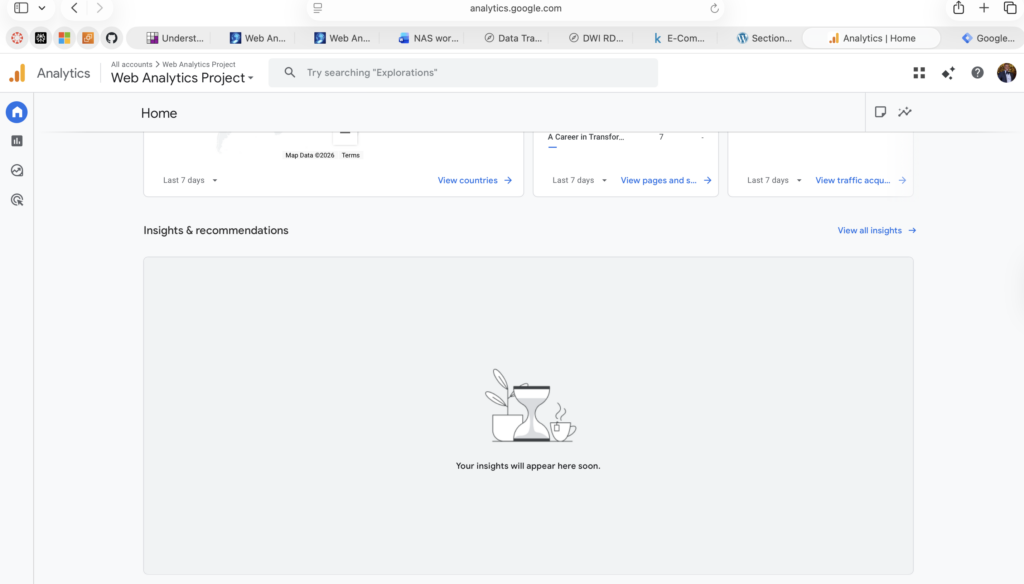
For the automated insights portion of the assignment, I accessed the Insights & recommendations area in GA4 to review whether Analytics Intelligence had generated any automated insight cards for my property. At the time of observation, the dashboard displayed the message “Your insights will appear here soon,” so there was not yet an automated insight available for interpretation. This was still an important result because automated insights in GA4 are generated automatically when the platform’s machine-learning system detects unusual changes or emerging trends in the data, such as spikes or dips in activity. In my case, the empty insights state likely indicates that my site has not yet accumulated enough traffic variation or signal for GA4 to surface a machine-detected anomaly. Even though no automated insights were produced, the exercise still helped me identify where automated insights appear, how they are accessed, and how dependent they are on the depth and pattern of recorded site activity.
Essay III. Summary/analysis of your “custom insights” (add screenshots) (one paragraph)
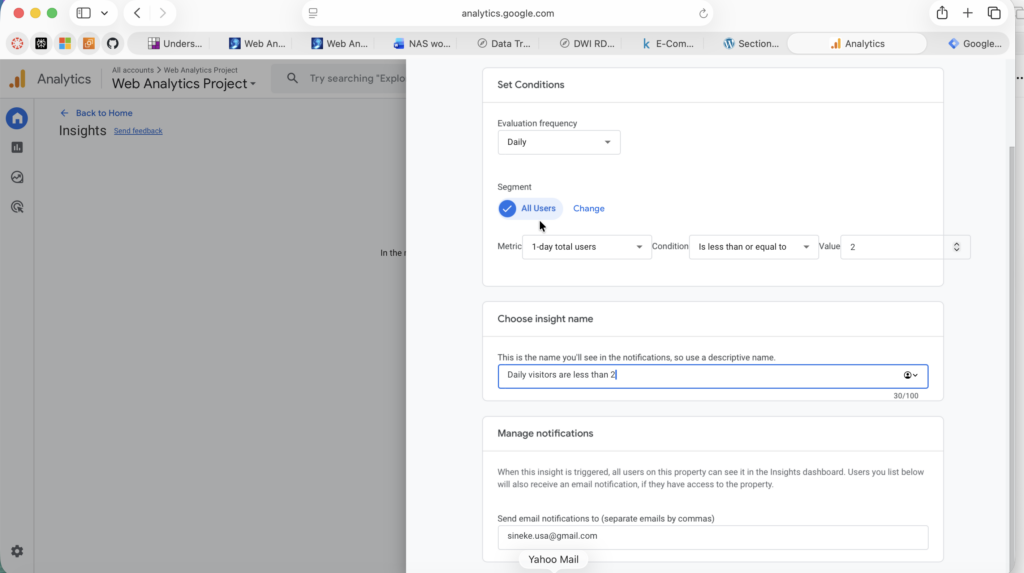
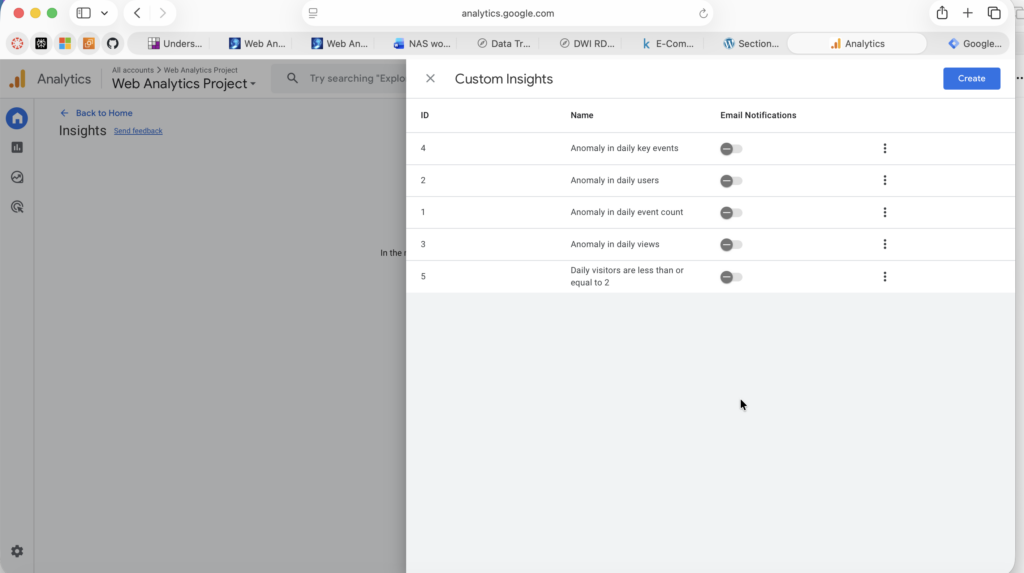
For the custom insights task, I created a custom insight from scratch in GA4 to monitor low-traffic days on my website. I set the evaluation frequency to Daily, kept the segment as All Users, and defined the rule using the 1-day total users’ metric with the condition less than or equal to 2, which allowed me to create an alert specifically tied to my current traffic level. I chose this rule because my website is still developing, so monitoring days with very low visitor activity is more useful at this stage than tracking only large spikes. This custom insight is valuable because it translates a simple KPI into a practical monitoring rule that can help me evaluate whether new posts, design updates, and navigation improvements are improving traffic over time. It also showed me the difference between automated insights, which depend on GA4 detecting patterns on its own, and custom insights, which let me define conditions that are directly relevant to my site’s goals and stage of growth.
References
Järvinen, J., & Karjaluoto, H. (2015). The use of Web analytics for digital marketing performance measurement. Industrial Marketing Management, 50, 117–127. https://doi.org/10.1016/J.INDMARMAN.2015.04.009
Fagan, J. C. (2014). The Suitability of Web Analytics Key Performance Indicators in the Academic Library Environment. The Journal of Academic Librarianship, 40(1), 25–34. https://doi.org/10.1016/j.acalib.2013.06.005
Optimize Smart. (2024, December 6). Understanding Automated Insights in Google Analytics 4 (GA4). https://www.optimizesmart.com/understanding-automated-insights-in-google-analytics-4-ga4/
Google Analytics Help. [GA4] Analytics Insights. https://support.google.com/analytics/answer/9443595?hl=en
Optimize Smart. (2024, November 18). How to create custom insights in Google Analytics 4 (GA4). https://www.optimizesmart.com/how-to-create-custom-insights-in-google-analytics-4-ga4/
Google Analytics Help. [GA4] Analytics Insights. https://support.google.com/analytics/answer/9443595?hl=en


No responses yet