
Time Log – time spent on other students’ sites (must have 4 entries or more):
Date: Feb. 18, 04min From: 16:41pm To: 16:45pm
Date: Feb. 18, 09min From: 16:55pm To: 17:04pm
Date: Feb. 20, 05min From: 20:55pm To: 21:00pm
Date: Feb. 21, 11min From: 11:21am To: 11:32am
Date: Feb. 21, 07min From: 12:05pm To: 12:12pm
Date: Feb. 21, 08min From: 12:54pm To: 13:02pm
Essay I – Weekly content activities (1 paragraph + clickable links)
This week on my Web Analytics by Sineke site, I created and published two new pieces of content and treated them as “measurement-ready” posts (clear headlines, scannable structure, and internal linking to support navigation and analysis in GA4). First, I posted a review of The Night Agent that focuses on the storyline and what viewers can expect, written in a way that supports engagement tracking (time on page, scroll depth, and next-page clicks). Secondly, I published an article on Small Data, explaining why smaller, well-contextualized datasets can still drive strong decisions when paired with the right questions and measurement plan.
Essay II — GA4 “Event” summary (1 paragraph + screenshot placeholder)
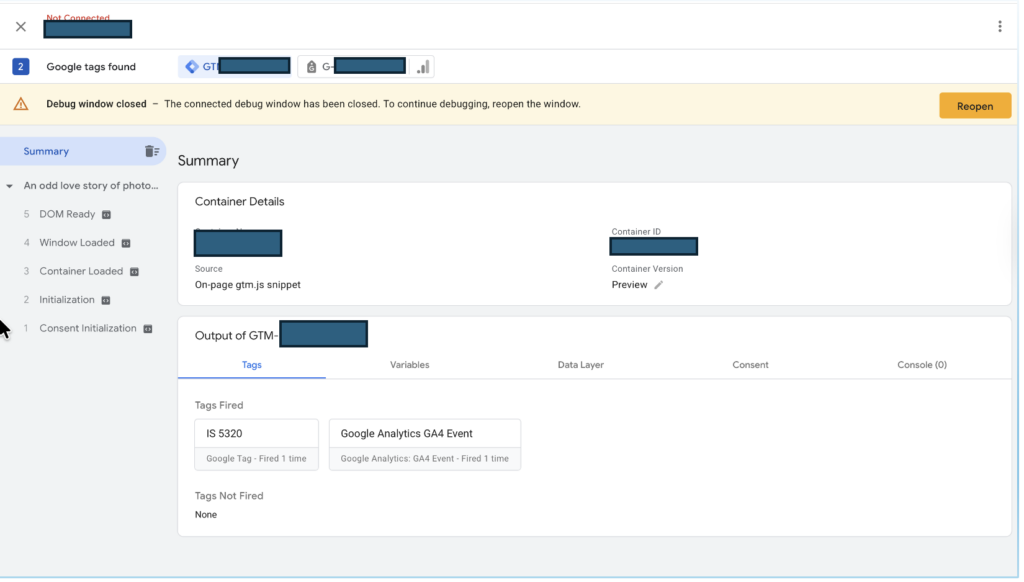
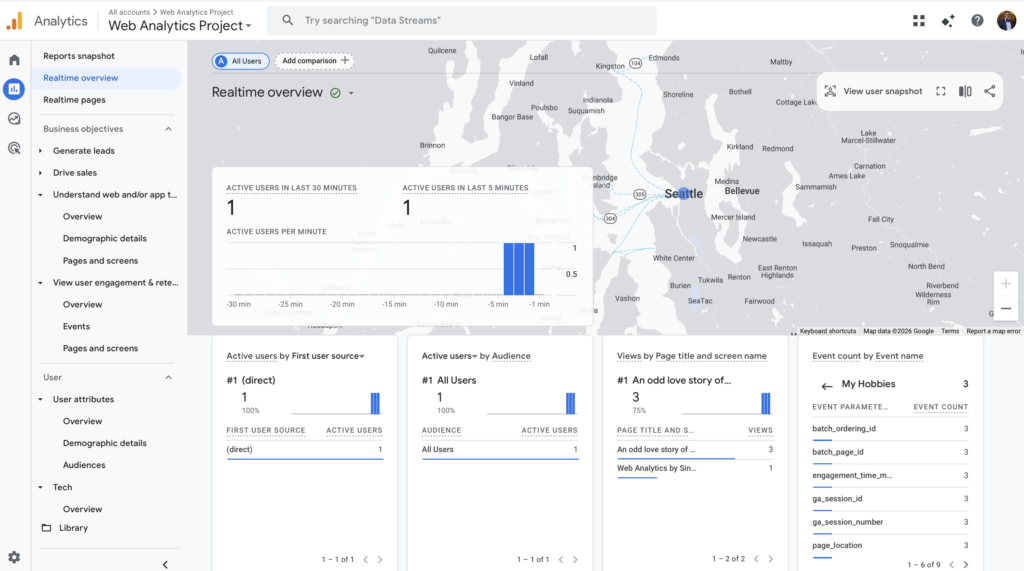
In GA4 this week, I successfully configured a custom event through Google Tag Manager by creating a tag called “my hobbies”, which now fires when users interact with my My Hobbies content (eg, visiting the page or clicking the related menu/link). After publishing the GTM changes, I validated the setup in GA4 (Realtime/DebugView) and then confirmed that the event is being collected and reported under Reports > Engagement > Events (see screenshot below), where GA4 summarizes event activity by event count, total users, and event count per active user. This event gives me a clearer, behavior-based signal of audience interest beyond page views and helps me measure whether visitors are actually reaching and engaging with that content as intended (Google, n.d.).
Essay III — Best use case for custom events in GA4 (1 paragraph)
A top use case for custom events in GA4 is tracking micro-conversions that show real intent, especially when default events (like page_view, scroll, and user_engagement) only tell you that an activity happened, not what content mattered. In this project, the custom event/tag my_hobbies is a strong example: it captures a meaningful action users intentionally reach or interact with the My Hobbies section, so I can measure interest in that specific content instead of guessing from general traffic. Once the event is collecting, I can mark my_hobbies as a conversion, build an audience of users who trigger it, and use funnel/path explorations to see how visitors arrive there (menu vs. internal links) and what they do next (continue reading, search, or submit a form). This turns GA4 from “counts of visits” into evidence of content performance and navigation effectiveness, helping me improve internal linking, menu structure, and calls-to-action based on observed behavior (Google, n.d.).
References (APA)
Feature image Source: https://community.thriveglobal.com/wp-content/uploads/2019/03/shutterstock_310700672.jpg
Google. (n.d.). About events. Google Analytics Help.
Google. (n.d.). Create and manage events. Google Analytics Help.
Google. (n.d.). [GA4] Enhanced measurement. Google Analytics Help.



No responses yet